XClass
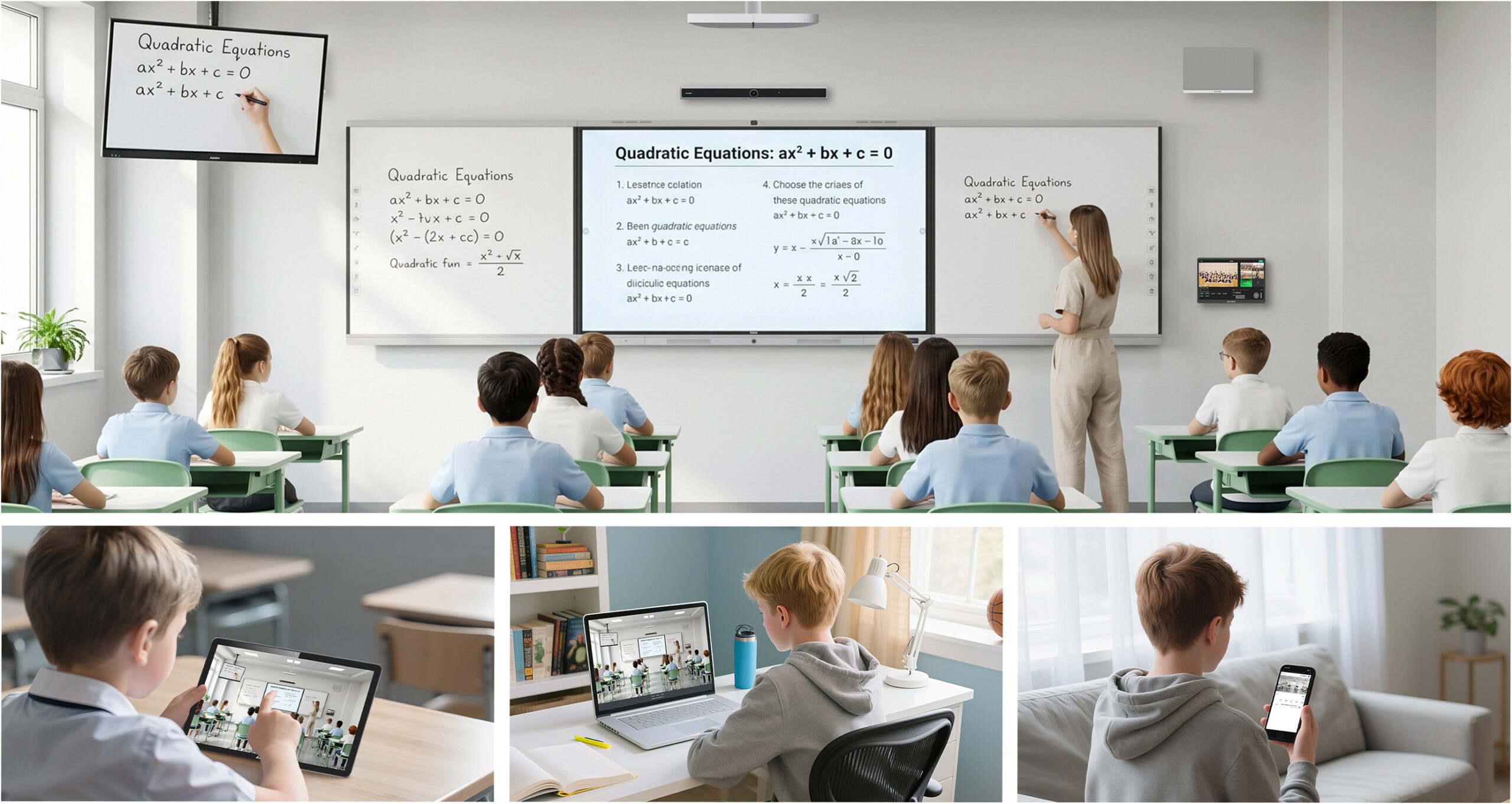
Hybrid Classrooms
XClass is an all-in-one online teaching platform designed for live classes, interactive learning, lecture recording, and post-class review.
Why XClass?
Easier Class Management
Create classes, invite participants, configure permissions, and manage schedules from one centralized workspace.
Smarter Live Teaching
Deliver engaging online lessons with real-time collaboration, AI-powered teaching tools, live chat, and cloud recording.
Better Learning Insights
Automatically organize recordings, learning data, and teaching resources to improve lesson quality and student outcomes.
Built for Every Stage of Online Teaching
Quick Class Creation
Create and launch live classes in minutes across multiple devices.
Collaboration
High-quality audio and video conferencing with AI-powered teaching assistance.
Analytics
Automatically record every lesson and generate learning insights for continuous improvement.
XClass Workspace
Manage classroom creation, scheduling, editing, and participation through a unified workspace with an intuitive calendar interface.
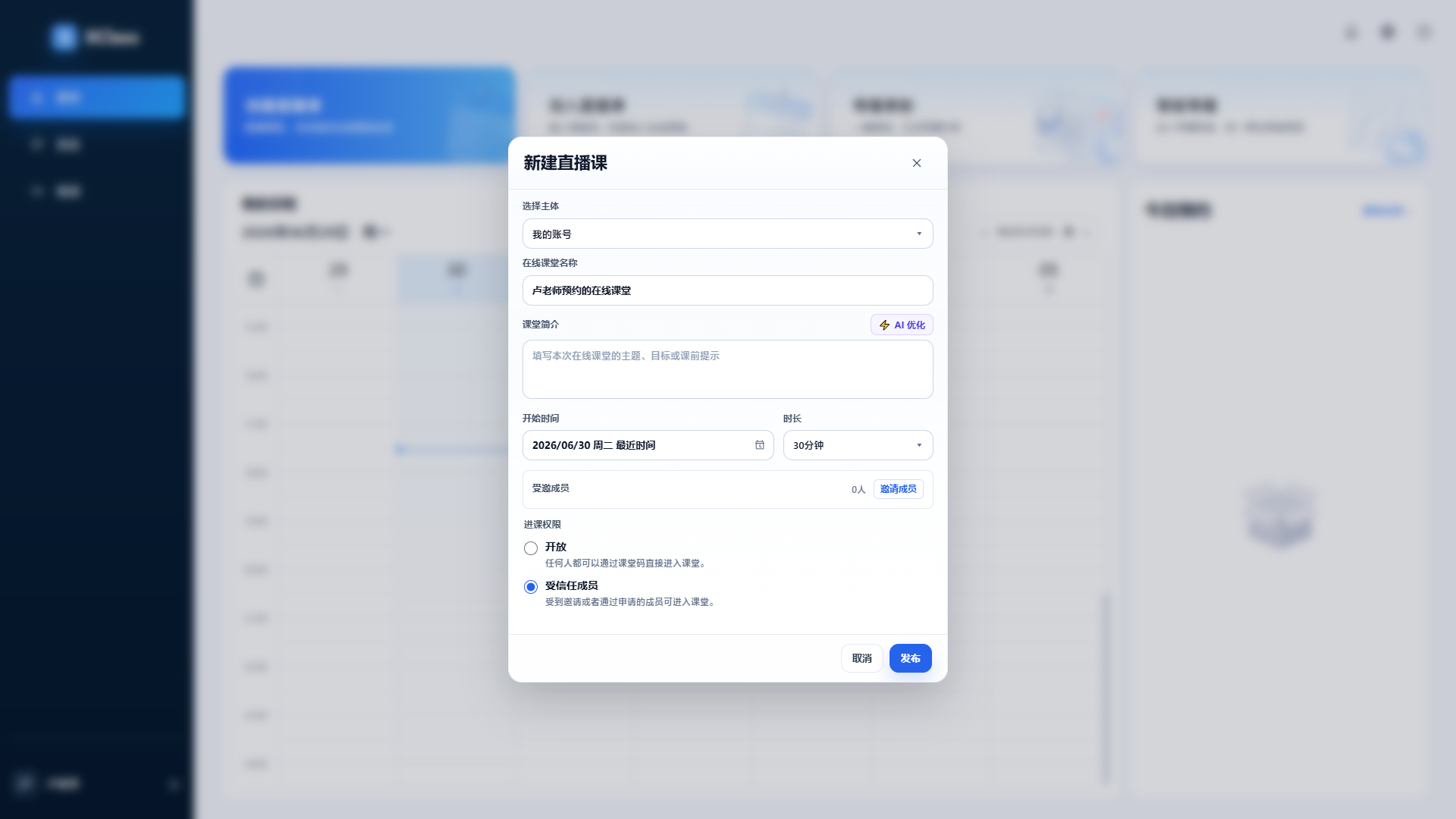
01 Create Classes
Create live classes from any device, invite participants, and configure classroom permissions with ease.
02 Edit Classes
Modify class details—including title, schedule, participants, and access permissions—before the session begins.
03 Join Your Class
Access classroom details directly from your calendar and enter live sessions with a single click.
04 Join with a Class Code
Students and teachers can join classes instantly using a class code across web, desktop, or mobile devices.
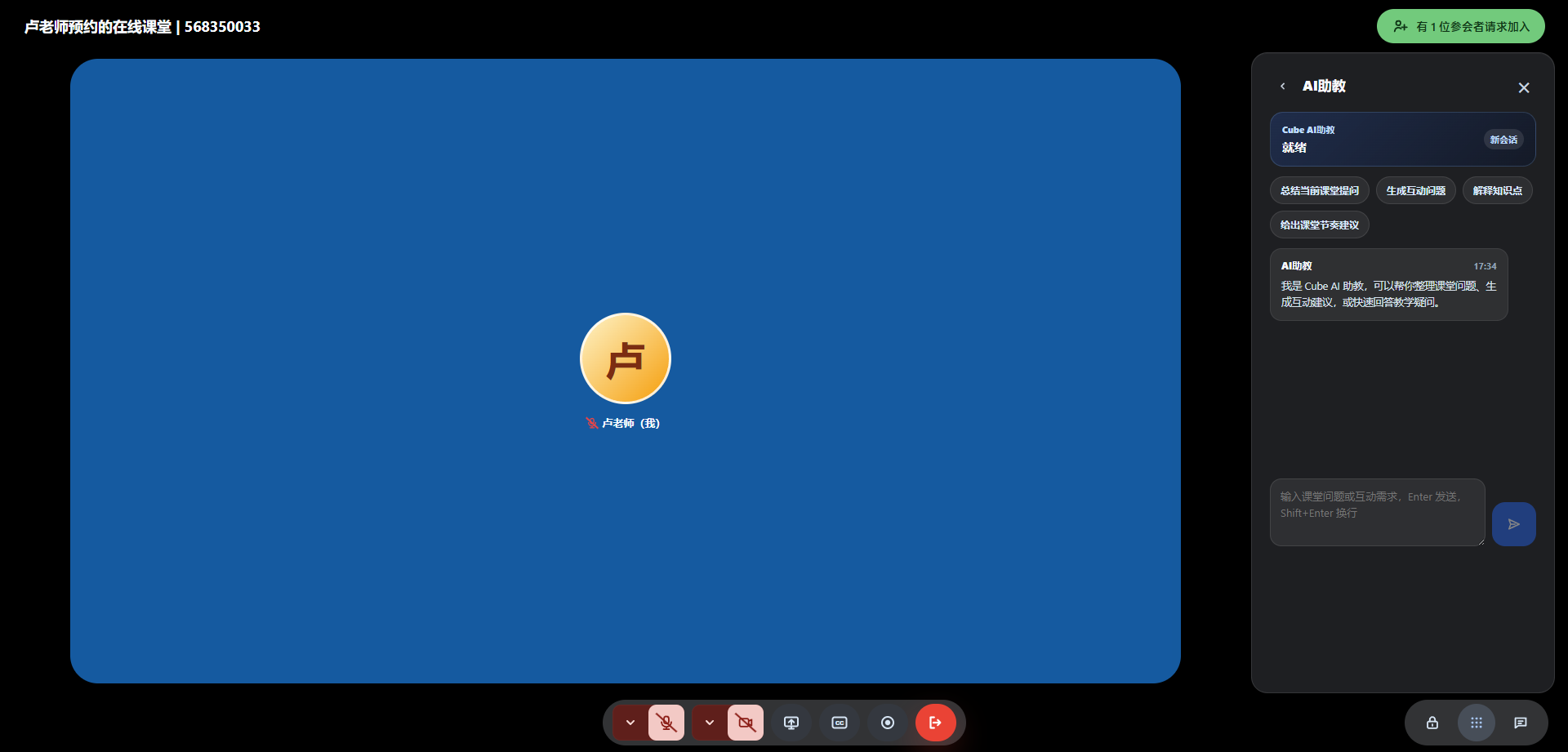
05 AI Teaching Assistant
Generate classroom Q&A, answer student questions, summarize key content, and reduce teachers’ administrative workload.
06 Live AI Captions
Automatically transcribe classroom conversations into real-time subtitles.
Support multiple languages, customizable font sizes, and subtitle colors.
07 AI Meeting Summary
Automatically capture key discussion points, lesson highlights, and action items for easy post-class review.
08 Speech-to-Text
Convert classroom conversations into searchable text transcripts in real time for documentation and knowledge management.
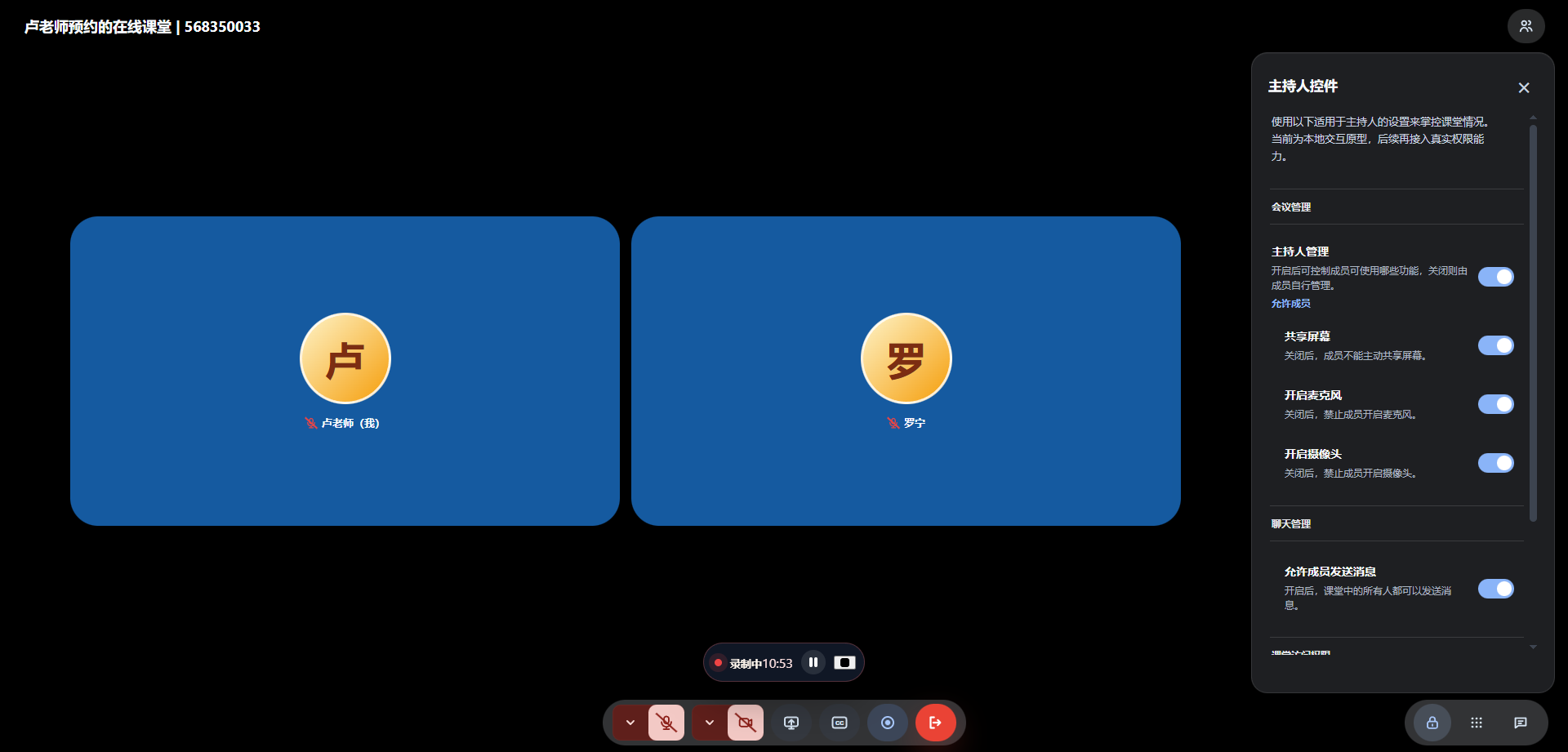
09 Classroom Permissions
Control participant permissions, including microphone, camera, screen sharing, chat, and classroom moderation.
10 One-Click Recording
Record every lesson with a single click and securely save content to the cloud.
11 Live Classroom Chat
Enable students and teachers to communicate instantly through integrated messaging during class.
Built-in Instant Messaging (IM)
Keep Teachers, Students, and Administrators Connected
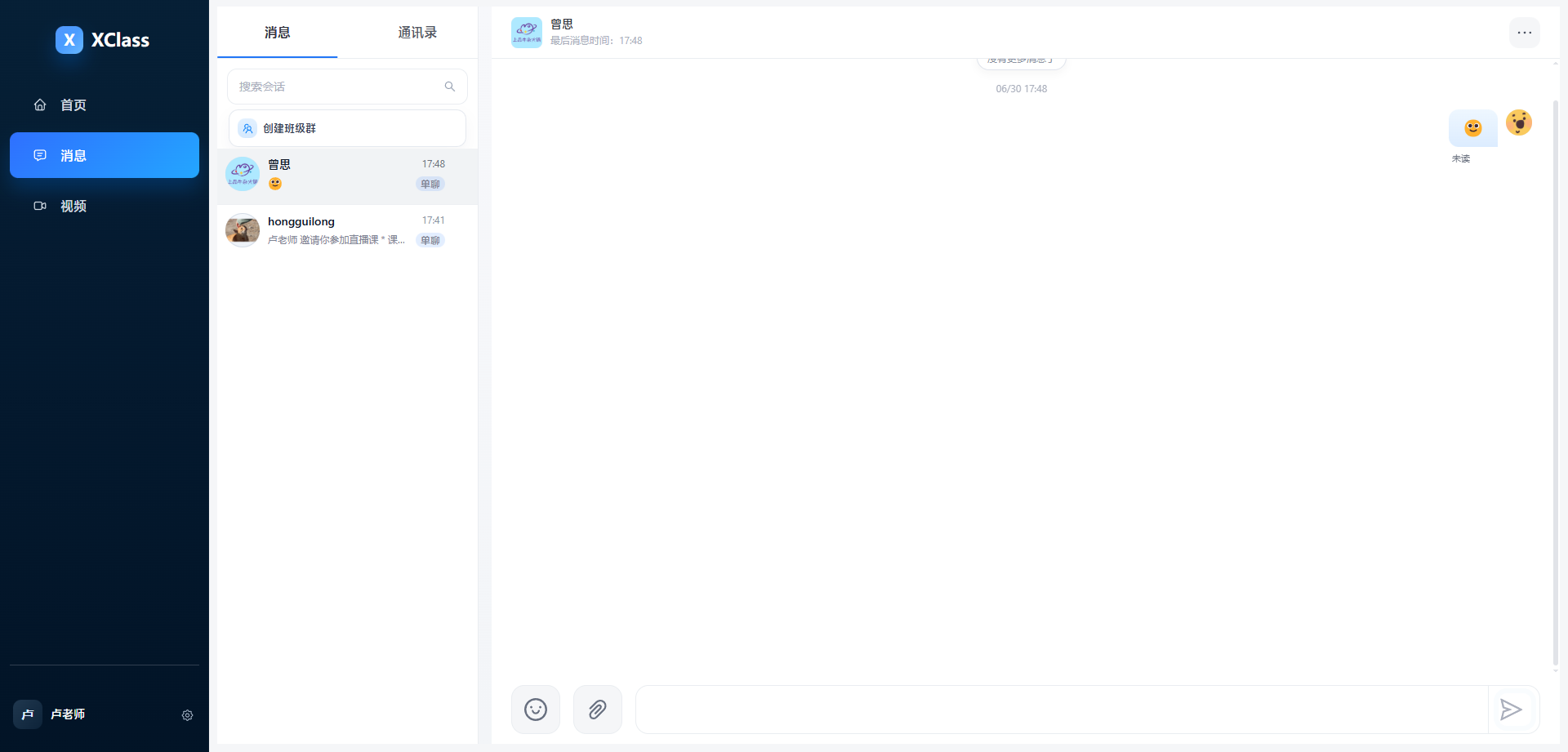
Group Chat
Create class groups for announcements, discussions, and collaborative learning with searchable chat history.
Add Friends
Search users and establish direct communication instantly.
Share Live Classes
Share classroom links, invitation codes, or QR codes directly in group chats so students can join with one click.
Share Class Recordings
Distribute recorded lessons to class groups for convenient review and self-paced learning.
Intelligent Video Director
Compatible with recording systems, PTZ cameras, and multi-camera setups.
Supports both manual and AI-powered automatic video directing for professional live streaming and recording.
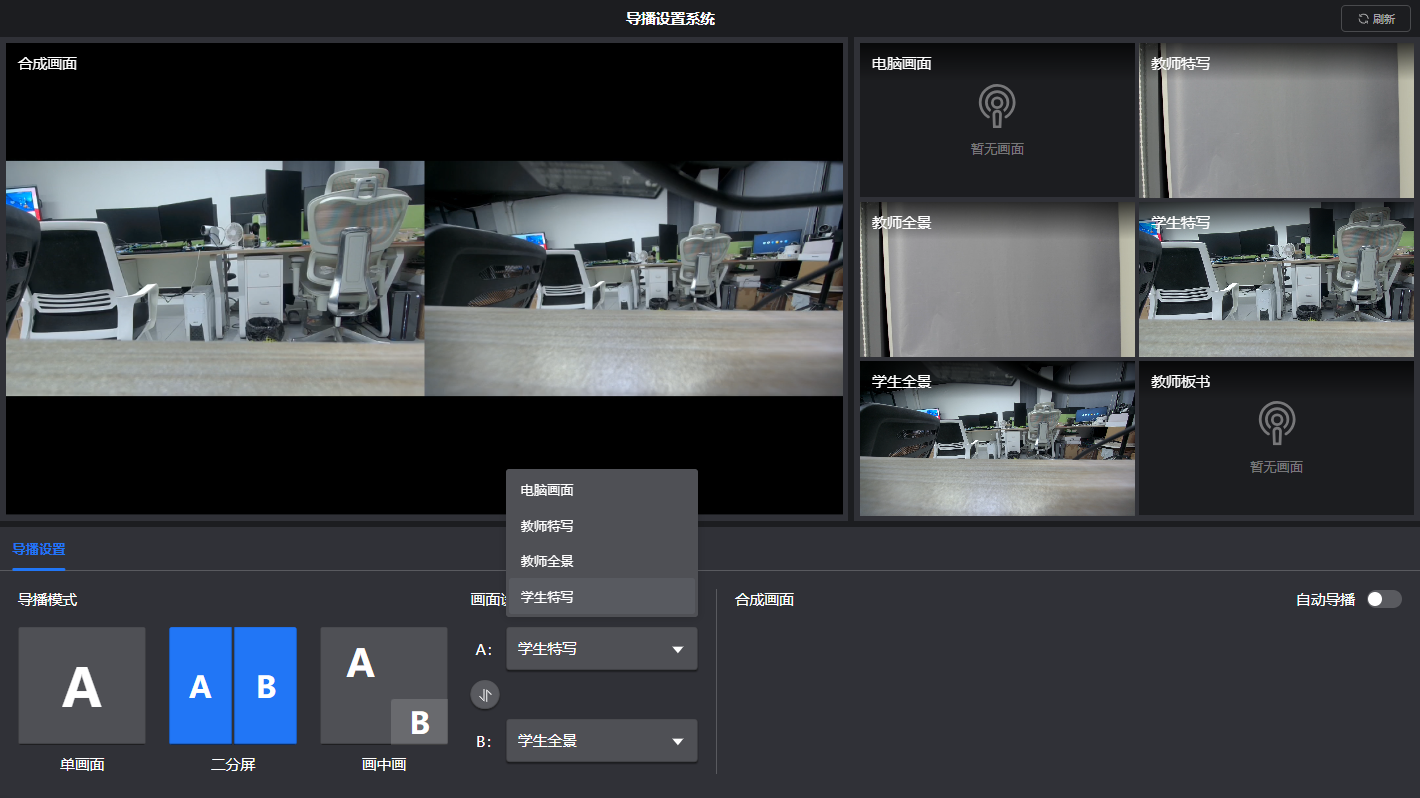
Manual Video Switching
Switch seamlessly between teacher view, student view, presentation content, or multiple camera feeds.
Perfect for lecture production and hybrid learning.
AI Auto Director
Automatically detects speakers and classroom activities, intelligently switching camera angles without manual intervention.
Reduce operational costs while delivering professional-quality recordings.
Video Resource Center
Manage cloud recordings and locally uploaded videos in one secure content library.
Quickly search, organize, download, and share educational resources.
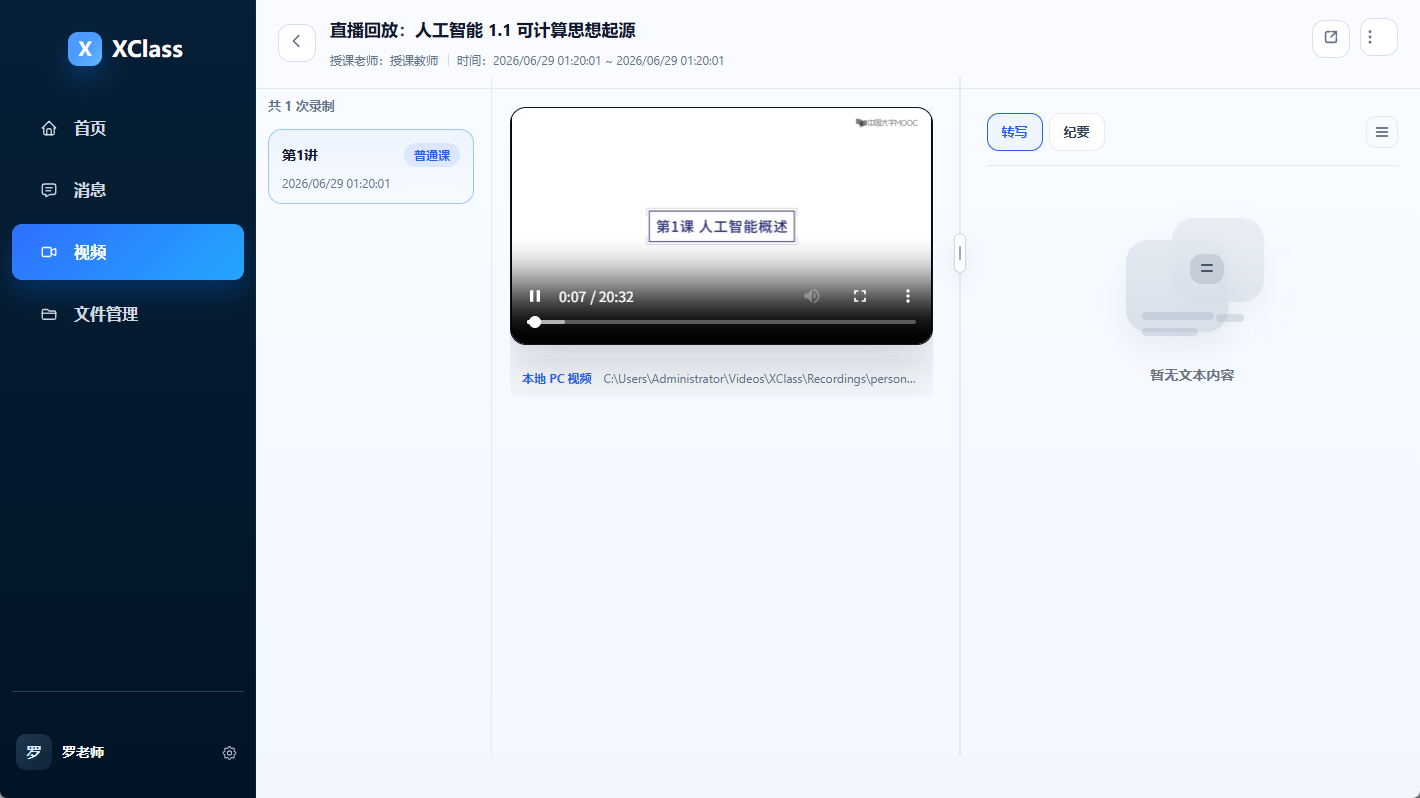
Video Playback
Automatically generate replay videos after each lesson.
Search recordings by course, instructor, or date for easy review.
Video Upload
Upload locally recorded lectures and organize them into your institution’s teaching resource library.
Video Download
Download recordings based on user permissions for backup, offline learning, or instructional content creation.
Video Sharing
Share recorded lessons with class groups, course spaces, or video portals in one click to maximize content reuse.
XClass服务版本
选择最适合您或您团队的解决方案
基础版
适合个人/小团队
1.推荐个体老师使用
2.满足直播、录播课等课前课后服务
3.限时Ai免费
4.可购1-5个账号
¥
58
¥98
/月/账号按年购买,或按每月¥68开通版本
包含免费版所有功能,以及:
限时福利:
额外赠送80G云存储
- 不限制上课次数,限制课时量
- 单次课堂不限时长制
- 100人课堂不限时教学
- 云端录课
- 50G存储空间
- 4人音视频实时互动+720P摄像头
商业版
适合个人/小团队
1.推荐小机构/小团队使用
2.满足直播、录播课等课前课后服务
3.具备完整管理后台,对团队和教学进行统一系统管理
4.限时Ai免费,有专业的教学顾问服务
5.可购6-255个账号
¥
88
¥128
包含免费版所有功能,以及:
限时福利:
额外赠送100G云存储
- 单次课堂24小时限制
- 300人不限时课堂
- 6人音视频实时互动+高清摄像头
- 云端录课,增加现场直播视角
- 100G存储空间
- 多路视频流录制
- 商业版后台
专享版
适合自由个体老师
1.预充值,按量付费
2.推荐自由个人在线教育老师
3.满足直播、录播课等课前课后服务
4.具备完整管理后台,支持专业技术对接服务
5.支持专属数字化教育使用解决方案
联系我们了解更多信息
包含免费版所有功能,以及:
- 预充值后付费模式
- 专属解决方案
- 即充即用
Contact Us
Schedule a demo to discover how live streaming, lecture recording & playback and devices management come together in one complete solution.
FAQ
XClass支持哪些设备、系统上课?
支持 Windows、Mac 电脑,安卓、苹果手机和平板;网页端、客户端均可进入课堂,无需复杂安装。
课堂录制会视频存在哪里?
本地录制视频保存再本地PC或者录播主机中,可在XClass客户端视频模块查看回放、上传视频。
录播回放可以限制外人随意查看吗?
可以。回放支持观看权限配置,可通过公开访问、密码访问或仅受邀学生访问等方式控制查看范围。
AI字幕、课堂纪要需要额外付费开通吗?
AI 字幕、课堂纪要和课程总结可按机构版本与开通能力配置,具体以实际采购和服务开通范围为准。
教师能否管控学生麦克风、摄像头权限?
可以。教师可以使用主持人控件统一管理学生麦克风、摄像头、屏幕分享和聊天权限,维护线上课堂秩序。
多校区、多位老师可以分开管理班级吗?
支持按机构空间、课程、教师和班级进行管理,方便多校区、多教师团队分工协作和统一运营。
更换设备登录,历史课堂数据会丢失吗?
云端课程、回放和学情数据会跟随账号与机构空间保留;本地录制文件则以原设备保存位置为准。